WhatsApp accepts every message your business sends and only afterwards decides whether to deliver it. The three most common reasons a message shows as sent but never arrives:

1. The 24-hour window is closed

WhatsApp only allows free-form messages within 24 hours of the contact’s last message to you. Outside that window — and always for a new contact who never wrote to you — only a pre-approved template message is delivered. Anything else is silently discarded by WhatsApp. What to do:
  • In iZap, failed messages show a red indicator with the reason. When the reason is the closed window, click Send template to reopen the conversation.
  • Create and submit templates in My Contents → Message Templates → New template. Choose the Marketing category to introduce your business, or Utility for transactional follow-ups. Meta usually approves within minutes (up to 24h). Every {{1}}-style variable needs an example value for approval.
  • Created the template directly in Meta’s WhatsApp Manager? Click Sync on the same screen to bring it into iZap.
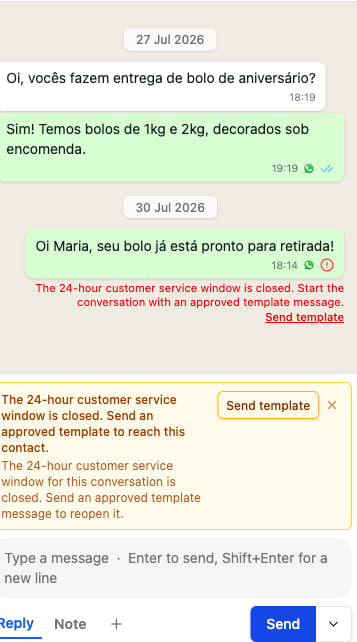
A failed message in the dashboard chat with the red closed-window reason and the Send template button.

A newly connected number has no templates yet

A number that was just connected starts with no approved templates. Until Meta approves the first one, you can only reply to contacts who wrote to you in the last 24 hours. Any attempt to start a conversation — including a test send — fails with error code 131047 (24-hour window closed). Create a simple Utility template as soon as you connect the number, so you have one ready when you need it.

2. The number is not on WhatsApp

If the destination number has no WhatsApp account, the send fails shortly after being accepted. iZap remembers these numbers and skips them in future broadcasts.

3. Marketing limits

Meta limits how many marketing messages a person receives. If a marketing template is throttled, wait and try again later — transactional (Utility) messages are not affected.

About the WhatsApp Business app (coexistence)

If your number is connected to iZap while you keep using the WhatsApp Business app, both stay in sync: messages you receive and send in the app appear in iZap, and messages sent through iZap (AI replies, broadcasts, dashboard chat) also appear in the WhatsApp Business app.

Checking a message

Every outbound bubble in the dashboard chat shows its delivery state: one check (Sent), two grey checks (Delivered), two blue checks (Read), and a red icon (Failed to deliver, with the reason). “Sent” alone means WhatsApp accepted the message — delivery is confirmed only when the second check appears.